
Site help
Lordrush Mastery says I am blocking ads, but I am not
If you disabled your ad blocker but still see our notice, another browser or network setting may be preventing ads from loading. Work through the checks below.
Last updated: July 7, 2026
Make sure Lordrush Mastery is allowlisted
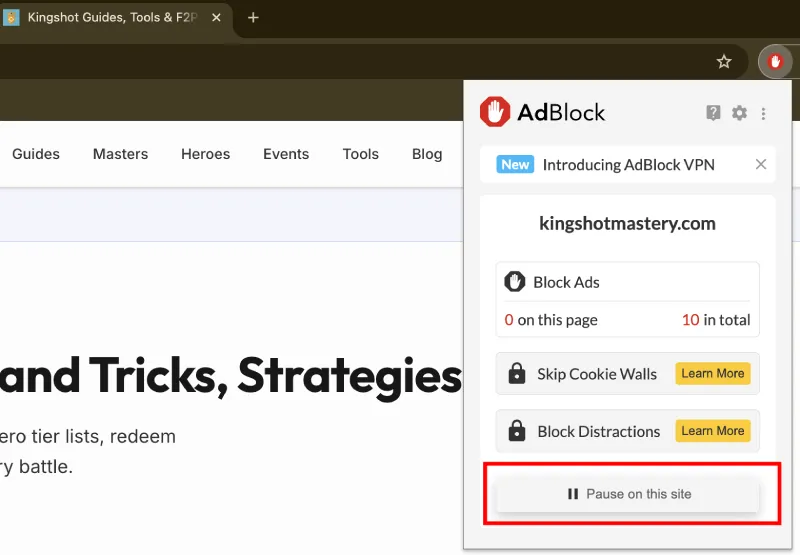
Turning off an extension globally and allowlisting one website are not always the same setting. Open your ad blocker while you are on Lordrush Mastery and choose the option to allow ads, pause protection, or disable blocking on this site.
After changing the setting, refresh the page. If the notice remains, close and reopen the tab before trying again.
Check other privacy extensions
An extension does not need to have “ad blocker” in its name to interfere with advertising. Cookie blockers, anti-tracking tools, script blockers, VPN extensions, and security extensions can all prevent an ad provider from loading.
Check which extensions can read and change data on this site. Temporarily pause them one at a time, refresh the page, and identify which one is responsible before changing its site permissions.
Review your browser protection settings
Browsers can block advertising and tracking requests without a separate extension. Brave Shields, Firefox Enhanced Tracking Protection, and Microsoft Edge Tracking Prevention can all affect third-party advertising when their strictest settings are enabled.
Use the browser's site controls to relax protection for Lordrush Mastery, then refresh. You do not need to lower protection for every website.
Check network-level blocking
DNS filters and network tools such as Pi-hole, NextDNS, antivirus web protection, firewall software, or a workplace network can block ad domains before the browser sees them. Browser extension settings will not override these tools.
If you manage the filter, allow Lordrush Mastery and the advertising requests it uses. If you do not manage the network, try a different trusted network to confirm whether network filtering is the cause.
Clear stale site data
A browser can occasionally keep an older blocked response or site setting. Perform a hard refresh, or clear cached site data for Lordrush Mastery and reload the page.
The notice remembers when you dismiss it for seven days. Clearing all site data will also clear that preference.
Still seeing the notice?
Tell us which browser, ad blocker, and privacy tools you use. That information will help us investigate false detections.
Contact Lordrush Mastery